When you log in to Timebutler, several absence types are already predefined for you, such as vacation, sick leave, training, business trip, home office, and others.
You can customize these absence types to fit your organization’s needs by:
- Editing existing absence types
- Creating new absence types
- Deactivating or deleting absence types that are not required
This allows you to tailor Timebutler precisely to your workflows.
Creating a New Absence Type
- Log in to Timebutler as an admin.
- Click “Settings > More…” in the lower-left corner.
- Select “Absence types.”
- Click the “Create new absence type” button.
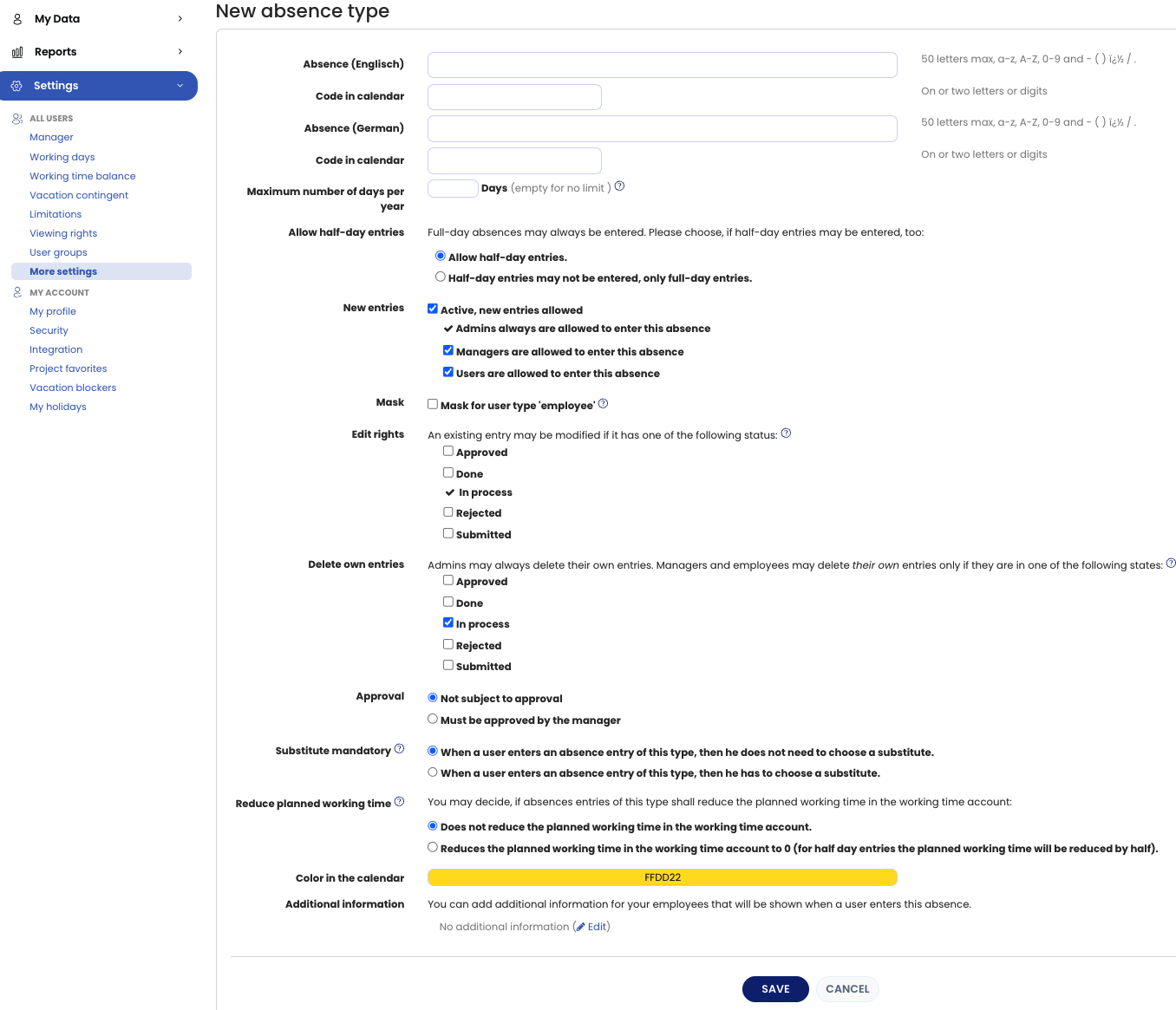
- Enter a name for the absence type and configure the available settings.
Once the absence type has been created, you can start creating absence entries for employees using this new type.
Editing an Existing Absence Type
- Log in to Timebutler as an admin.
- Click “Settings > More…” in the lower-left corner.
- Select “Absence types.”
- In the overview, you will see all existing absence types and their current settings.
- To edit an absence type, click the green pencil icon (Edit) in the row of the relevant absence type.
- Make the required changes and save them.
Deleting an Absence Type
Instructions on how to delete an absence type are provided in the delete an absence type chapter.
Screenshot: Create a new absence type