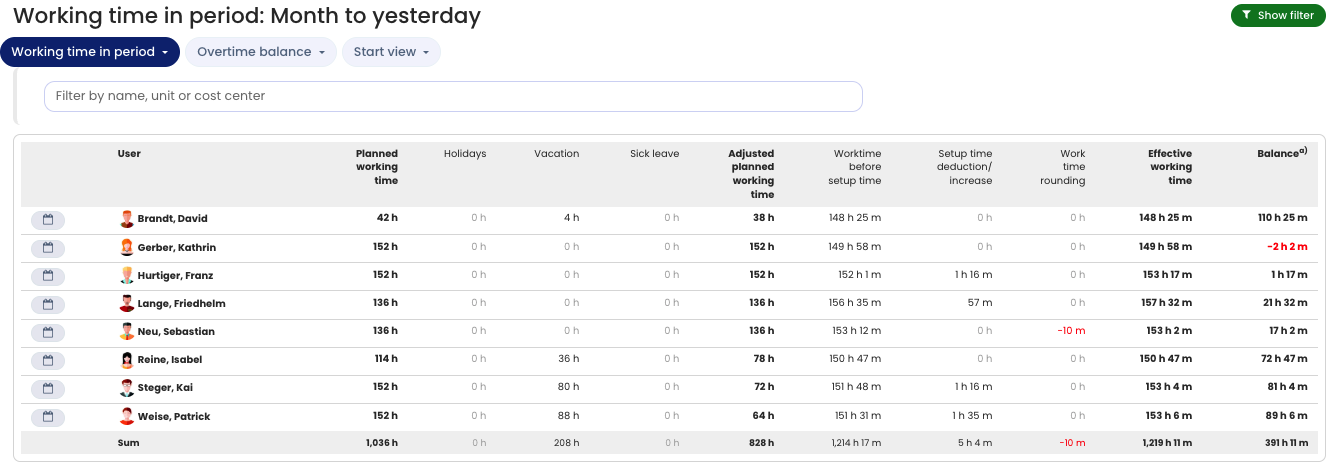
In the Working time in a period view, you can see how much working time was performed in the selected period. This view does not include the carryover or capping of overtime between months and years; it only shows the working time in the period. Read here how to open the working time account.
Read the working time account from left to right: almost all numbers in it result from adding or subtracting the numbers in the respective columns. In detail:
Columns in the working time account
User — Name of the employee. Click the icon to go to the calendar view of working time entries.
Target working time — The employee’s total target working time in the selected period. It equals the sum of all target working times of the calendar days in the period.
Public holidays — The total number of hours on public holidays in the selected period. It equals the sum of all target working times on all days that count as public holidays for the employee.
Vacation — The total number of vacation hours in the selected period. It equals the sum of all target working times on all days on which the employee has vacation entered and approved.
Sickness — The total number of sickness hours in the selected period. It equals the sum of all target working times on all days on which sickness is recorded for the employee.
Other absences — The total number of hours of other absences in the selected period that are set to reduce the target working time. It equals the sum of all target working times on all days on which the employee recorded one of these absences.
Adjusted target working time — The actual target working time. This equals the Target working time column minus Public holidays, Vacation, Sickness, and Other absences.
Working time incl. setup time (1) — The actual working time performed. It equals the sum of all the employee’s working time entries in the period. Deductions due to setup times or the rounding of overtime are not yet included here.
Deduction for setup times (1) — The total time deducted due to the setup time setting.
Rounding to target working time (1) — The total time deducted or added due to the working time rounding setting.
Working time performed — The actual working time performed after deducting any rounding and setup times. It equals the sum of all the employee’s working time entries in the period. If setup times or the rounding of working times are configured, those deductions are already included here.
Balance — The number of hours above or below the working time to be performed. It equals Working time performed minus Adjusted target working time.
(1) These columns only appear when the corresponding settings are activated.
Tip: Move the mouse over the column headers in the working time account to see additional information for each column.
The working time account in the Working time in a period view