If an employee has accumulated a lot of overtime, you can convert this working time credit into vacation. You reduce the overtime credit in the working time account and increase the vacation contingent in the vacation account. An admin can perform the conversion.
Here is an example for employee Schmitt, who has 60 hours of overtime in their working time account and wants to convert 40 h of it into 5 days of vacation:
Reduce working time credit
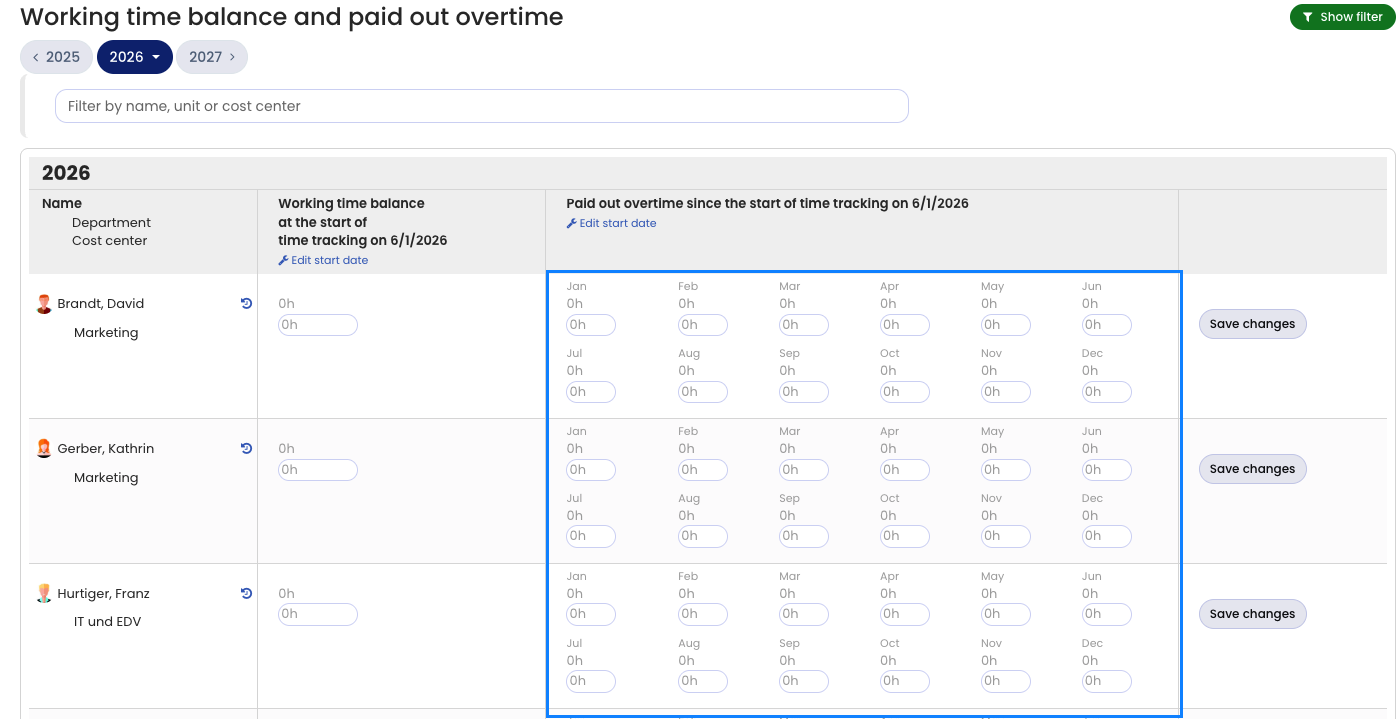
To reduce the working time credit, enter the overtime as paid overtime (inform the employee that this is not an actual payout, but that the overtime was converted into vacation). For Schmitt, enter 40 hours of overtime as paid overtime.
Sign in to Timebutler as an admin and go to Settings > Working time balance and paid out overtime at the bottom left. In the row of the affected employee, increase the value in the current month under Paid overtime by the number of paid overtime hours. Then click the blue Save changes button on the right in the row.
Increase vacation credit
Sign in to Timebutler as an admin and go to Settings > Working time balance and paid out overtime at the bottom left. In the row of the affected employee, increase the value in the Special leave column by the desired number of days. If “0” is entered for Schmitt, change it to “5”. If “2” is entered there, change it to “7”.
That’s it. The employee immediately has 40 h deducted from the working time account and 5 days added to the vacation account.
Are you looking for the reverse case? Read here how to convert vacation into working time credit.
Screenshot: Enter paid overtime (time tracking)