The Court of Justice of the European Union ruled that the employer must enable employees to take paid annual leave. The employer must also prompt employees to take their remaining vacation in time and must inform them about expiry deadlines.
In Timebutler, there are two ways to notify employees individually about their remaining vacation with just a few clicks:
Written notification with signature
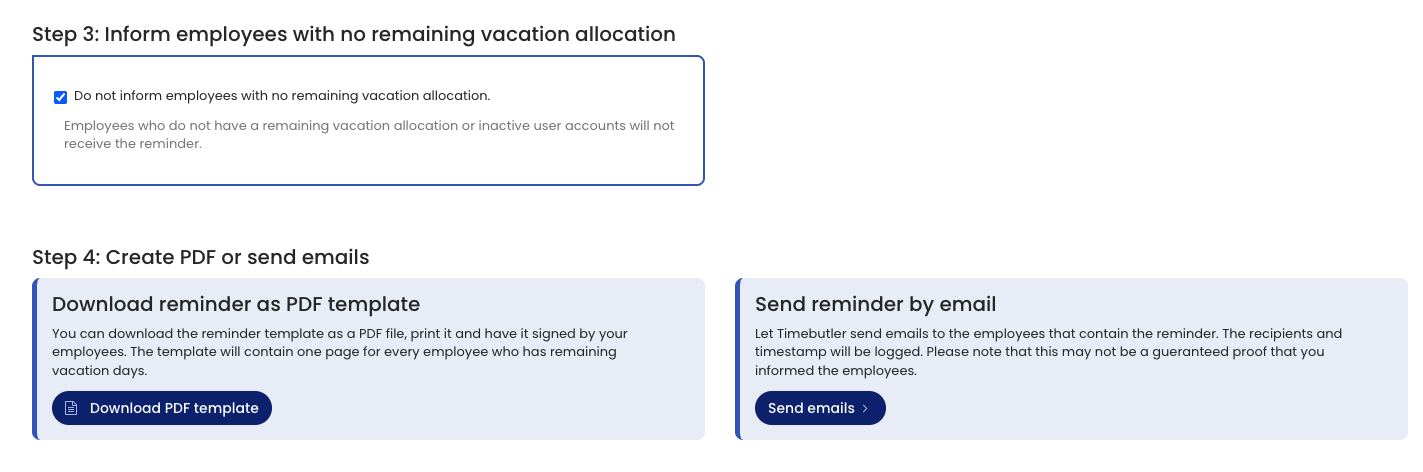
An admin can download a PDF template that lists each employee’s individual remaining vacation along with a request to schedule it. You can print the PDF template and present it to employees, who then acknowledge receipt by signing.
To download the template for the written notification, sign in to Timebutler as an admin and go to Settings > More… > Remaining vacation reminder (the last item is on the right). On the page, click the Download PDF template button.
Notification by email
You can also have Timebutler automatically send a personal email to each employee. The email also includes the information about the individual remaining vacation along with the request to schedule it.
To send the emails automatically, sign in to Timebutler as an admin and go to Settings > More… > Remaining vacation reminder (the last item is on the right). On the page, click the Send emails button.
Custom text template
Timebutler provides a ready-made text template for the notification. You can change the text template and adapt it to your needs. In your text template, you can use several placeholders that Timebutler replaces automatically, for example with the employee’s name or the employee’s individual remaining vacation. The available placeholders are described when you edit the text template.
Delivery log
When sending emails, Timebutler logs the recipients’ names, the number of remaining vacation days, and the date when you requested the send. For companies with hundreds of employees, Timebutler does not send the emails simultaneously, but distributes them over several hours depending on company size. This reduces the likelihood that spam filters sort out the emails. Timebutler informs you about the sending period.
Obligation to provide evidence: The employer should be able to prove that they informed the employee. Email sending is more convenient, but compared with the written PDF template it makes it harder to provide proof.