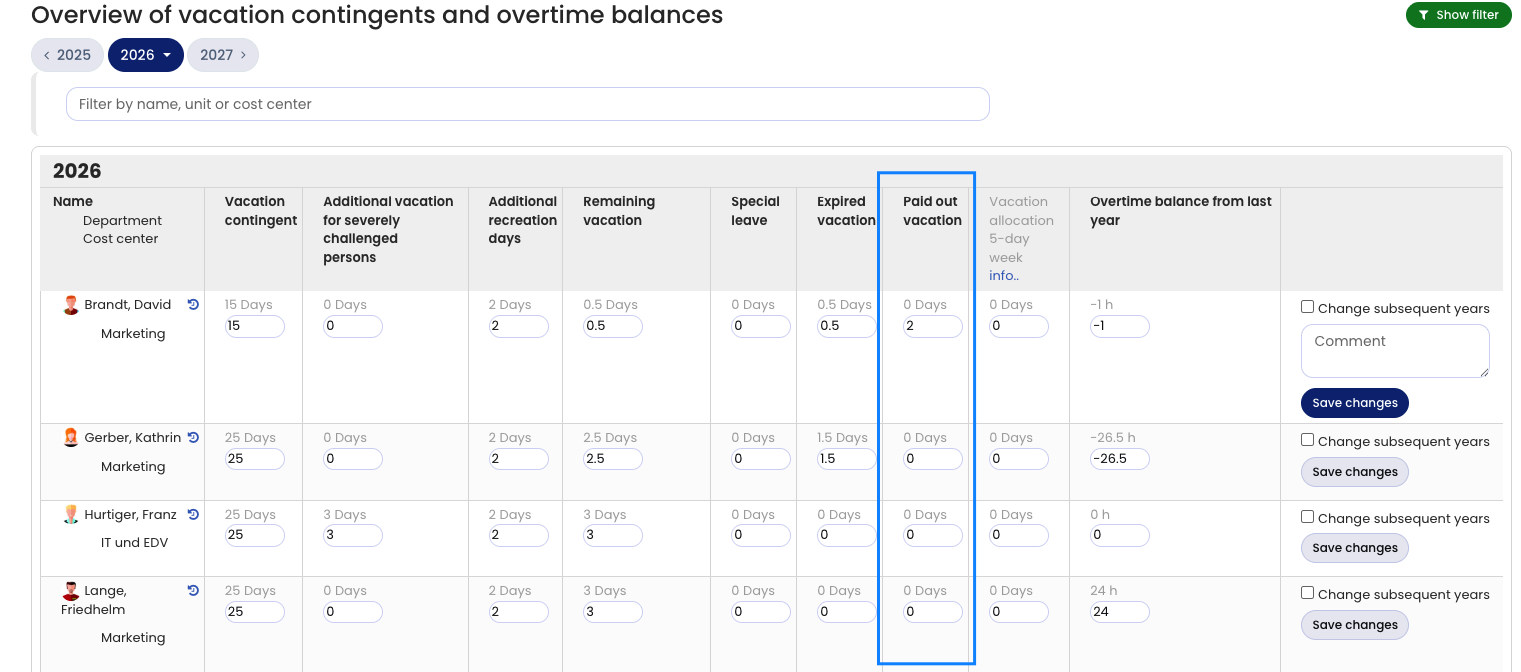
When an employee receives a vacation payout, the employee’s vacation contingent for that year decreases. You can record the paid-out vacation in Timebutler with a few clicks, as follows:
Record paid-out vacation
Sign in to Timebutler as an admin and go to Settings > Vacation contingent at the bottom left. In Schmitt’s row, increase the number in the Paid-out vacation column by 2 days. If it shows 0, enter 2. Then click the Save changes button on the right in the row. This immediately deducts 2 vacation days from the employee’s vacation account.
Convert salary into vacation
Read here how to handle the reverse case: Convert salary into vacation.
Convert vacation into working time credit
If you don’t pay out the vacation but convert it into working time credit, read here how to convert vacation into working time credit in Timebutler.
Screenshot: Record paid-out vacation