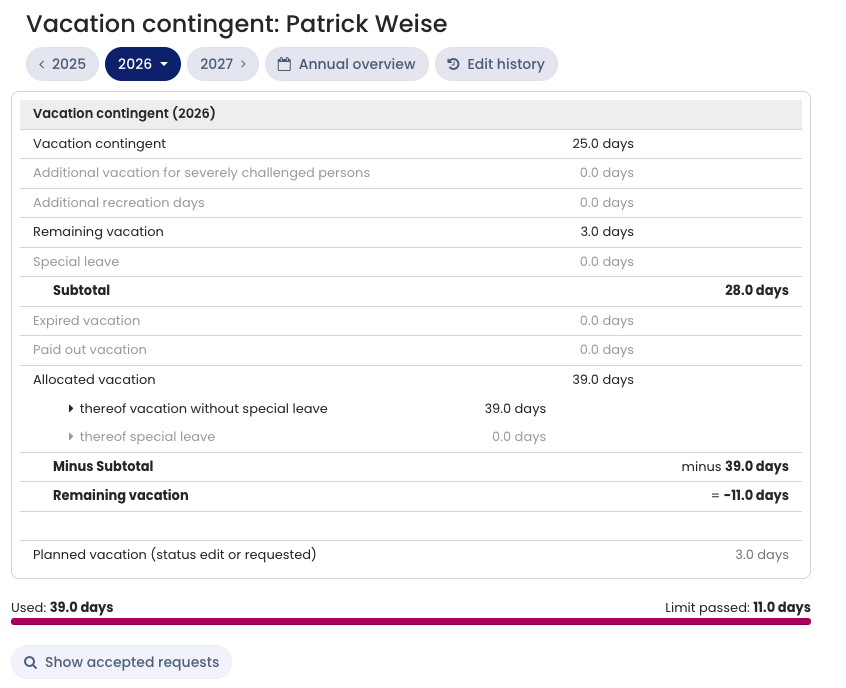
Timebutler maintains a vacation account for every employee and takes approved vacation requests, public holidays, weekly working days, vacation contingent, and all other settings into account when calculating the balance. The vacation account always covers a calendar year.
Employee users can view their own vacation account at any time. To do so, the employee user signs in to Timebutler and goes to Leave > Your vacation account on the left.
Managers and admins can also view their own vacation account, and additionally the vacation accounts of the employees they have permission to view. To do so, the manager or admin signs in to Timebutler and goes to Employees > Absences > Vacation contingent on the left.
Structure of the vacation account
The vacation account displays the different vacation contingent data:
- Vacation contingent, special leave, and remaining vacation from the previous year (Timebutler adds these to the vacation balance)
- as well as expired vacation and paid-out vacation (Timebutler subtracts these from the vacation balance).
This results in the total vacation balance for the year. Timebutler then subtracts the approved vacation days, which yields the remaining vacation contingent.
Additional entitlement types
In the vacation account, you can enable the display of vacation for severely challenged persons and also enable another vacation contingent type, for which you can define your own label.
Notify employees about remaining vacation
For remaining vacation to expire, the employer must notify employees about their remaining vacation.
Calculate accruals
Learn how to determine the open vacation balance for accruals.
Let remaining vacation expire
Learn how to proceed with the expiration of remaining vacation.
Carry over remaining vacation to the following year
Timebutler intentionally does not transfer remaining vacation from one calendar year to the next automatically. You can do this with a few clicks. Learn how to carry over remaining vacation to the following year.
Screenshot: Example vacation account of an employee