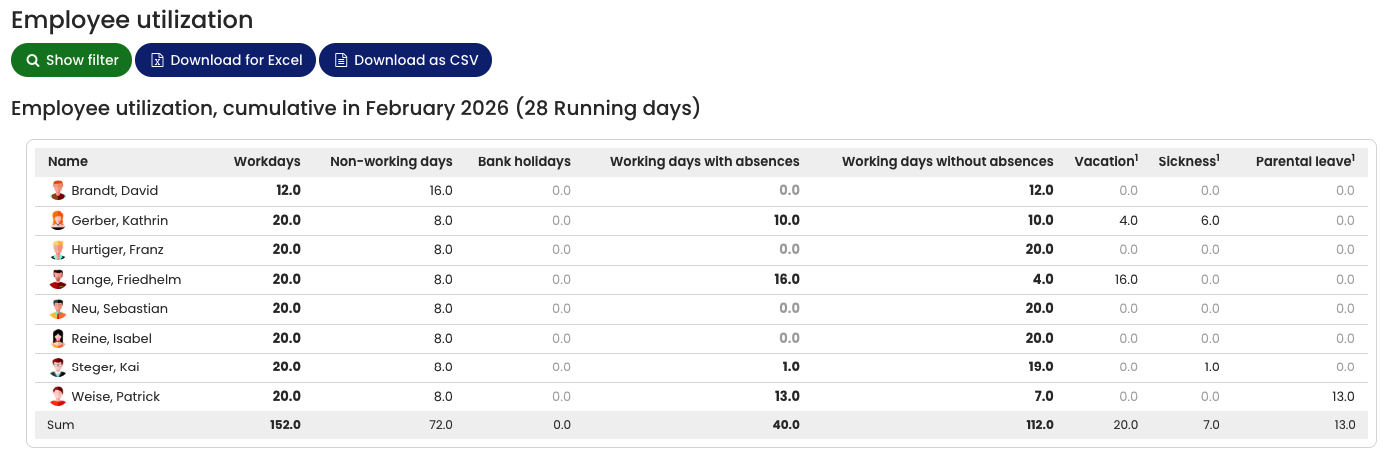
The Employee utilization report is available in four variants:
- Cumulative absences report
- Grouped absences report
- List view on a daily basis
- Grouped work time report
Open the Cumulative Absences Report
- Log in to Timebutler as an Admin.
- Go to Reports > Employee utilization.
- Select Cumulative absences report.
- Click Show report.
You can download the report as:
- Excel file
- CSV file
Content of the Report
The Cumulative absences report shows the total number of:
- Workdays
- Vacation days
for all absence entries within the selected period.
The calculation is strictly monthly.
Example: If a vacation request starts in May and extends into June, and you generate the report for May, only the vacation days that fall within May are included.
For certain use cases, such as calculating provisions, a strictly monthly evaluation may be required.