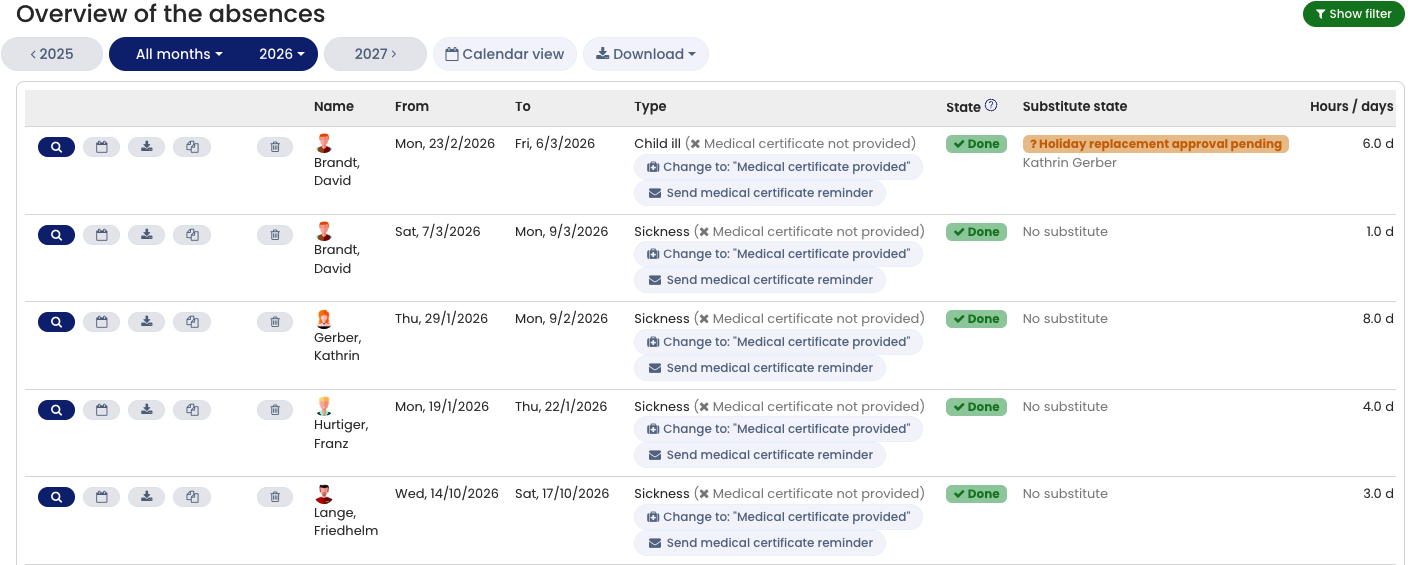
For every sick leave entry, you can manage the medical certificate status.
This status shows whether the medical certificate has been received and filed by the employer, or whether it is still outstanding.
Editing the Medical Certificate Status as an Admin
Admins can update the medical certificate status for any sick leave entry.
To do this:
- Log in to Timebutler as an admin.
- Go to Employees > Absences > Sick reports.
- In the list of sick leave entries, use the available buttons to update the medical certificate status.
You can also update the status in the detail view:
- Click the blue magnifying glass icon (Detail view) next to the entry.
- Use the available buttons to change the medical certificate status.
Alternatively, you can open the detail view directly from the calendar view by clicking on the relevant sick leave entry.
Editing the Medical Certificate Status as a Supervisor
Admins can decide whether supervisors are allowed to update the medical certificate status.
To configure this setting:
- Log in as an admin.
- Click Settings > More… in the lower-left corner.
- Select Global settings.
- Review or adjust the option “Manager may edit medical certificate information.”
- Also review the option “Medical certificate display.”
If enabled, supervisors can update the medical certificate status in the same way as admins.
Note: Supervisors can only edit medical certificate information for employees assigned to them.
They cannot edit this information for employees they can see only through extended visibility rights.
Editing the Medical Certificate Status as an Employee
The medical certificate status does not indicate whether the employee personally has obtained a certificate. It indicates whether the employer has received the certificate.
For this reason, users with employee permissions cannot update the medical certificate status. Only admins and supervisors can make changes.
Learn how to set up additional sickness information, especially in connection with the electronic certificate of incapacity for work.
Screenshot: Sick leave entries overview.