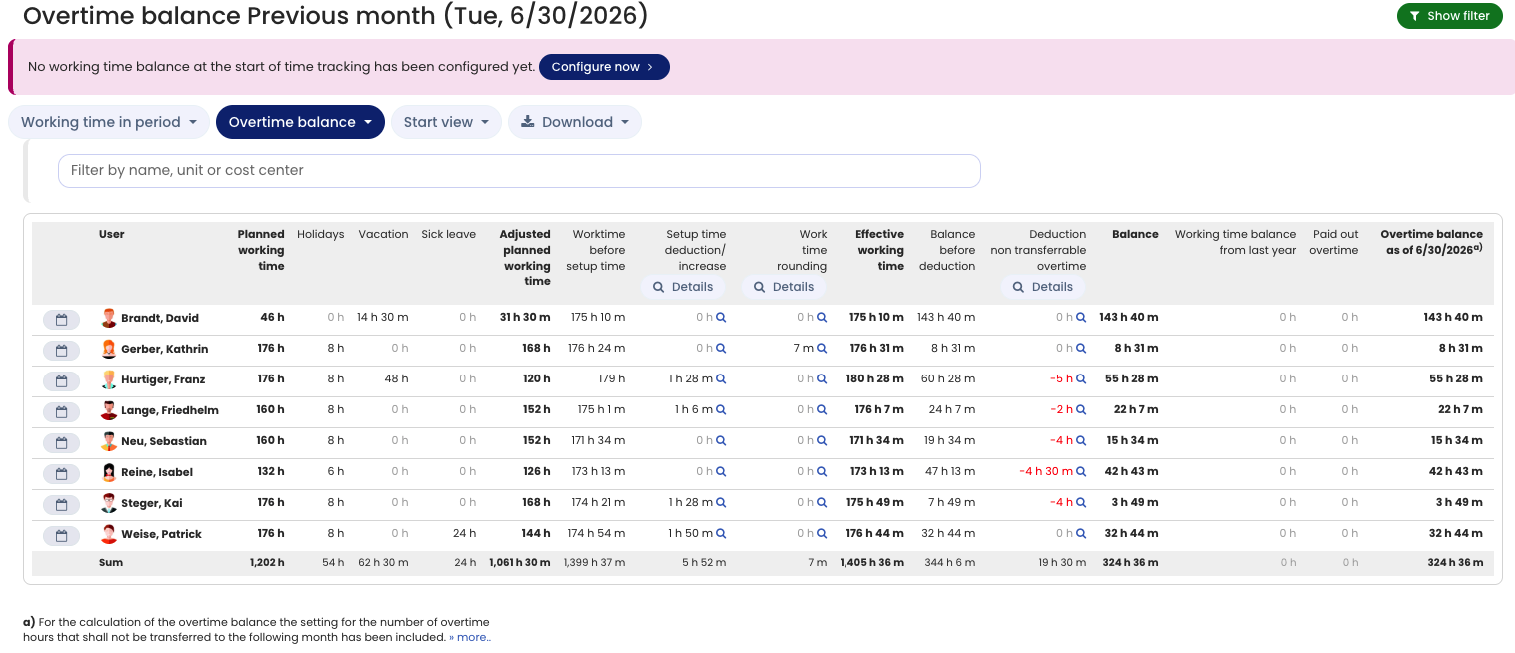
In the Overtime balance as of the cut-off date view, you can see how much working time was performed in a specific period. In the Overtime status as of the cut-off date view, you can display an employee’s overtime status for any date, including all historical data, capped overtime, rounding, setup times, and other reductions. Read here how to open the working time account.
Read the working time account from left to right: almost every figure results from adding or subtracting the columns to its left. In detail:
| Column | Meaning |
|---|---|
| User | The employee’s name. Click the icon to open the calendar view of time entries. |
| Planned working time | The employee’s total planned working time in the selected period. It equals the sum of all planned working times for the calendar days in the period. |
| Holidays | The total hours on public holidays in the selected period, that is, the sum of all planned working times on days set as a public holiday for the employee. |
| Vacation | The total vacation hours in the selected period, that is, the sum of all planned working times on days for which the employee has approved vacation. |
| Sick leave | The total sick leave hours in the selected period, that is, the sum of all planned working times on days on which the employee recorded sick leave. |
| Other absences | The total hours for other absences that are configured to reduce the planned working time, summed across the selected period. |
| Adjusted planned working time | The actual planned working time: the Planned working time column minus Holidays, Vacation, Sick leave, and Other absences. |
| Worktime before setup time ¹ | The working time performed, before any setup-time or rounding deductions. It equals the sum of all the employee’s time entries in the period. |
| Setup time deduction/increase ¹ | The time deducted based on the setup time setting. |
| Work time rounding ¹ | The time deducted or added based on the working time rounding setting. |
| Effective working time | The actual time worked after any rounding and setup-time deductions. If those settings are enabled, the deductions are included here. |
| Balance before deduction ¹ | The overtime or minus hours in the period before deducting non-transferrable overtime: the Effective working time column minus Adjusted planned working time. |
| Deduction non transferrable overtime ¹ | The hours deducted based on the overtime capping setting. |
| Balance | The hours and minutes worked too much or too little in the period, after deducting non-transferrable overtime: the Balance before deduction column minus Deduction non transferrable overtime. |
| Working time balance from last year | The overtime balance as of January 1, carried over from the balance on December 31 of the previous year. If the numbers don’t match, read how to carry over the overtime balance. |
| Paid out overtime | The number of paid out overtime hours in the period. |
| Overtime balance as of dd.mm.yyyy | The employee’s overtime balance on the selected date, including all historical data, capped overtime, rounding, setup times, and other reductions. |
¹ These columns appear only if the corresponding settings are activated.
Help for each column
Hover over any column header in the working time account to see additional information.
The working time account in the Overtime balance view