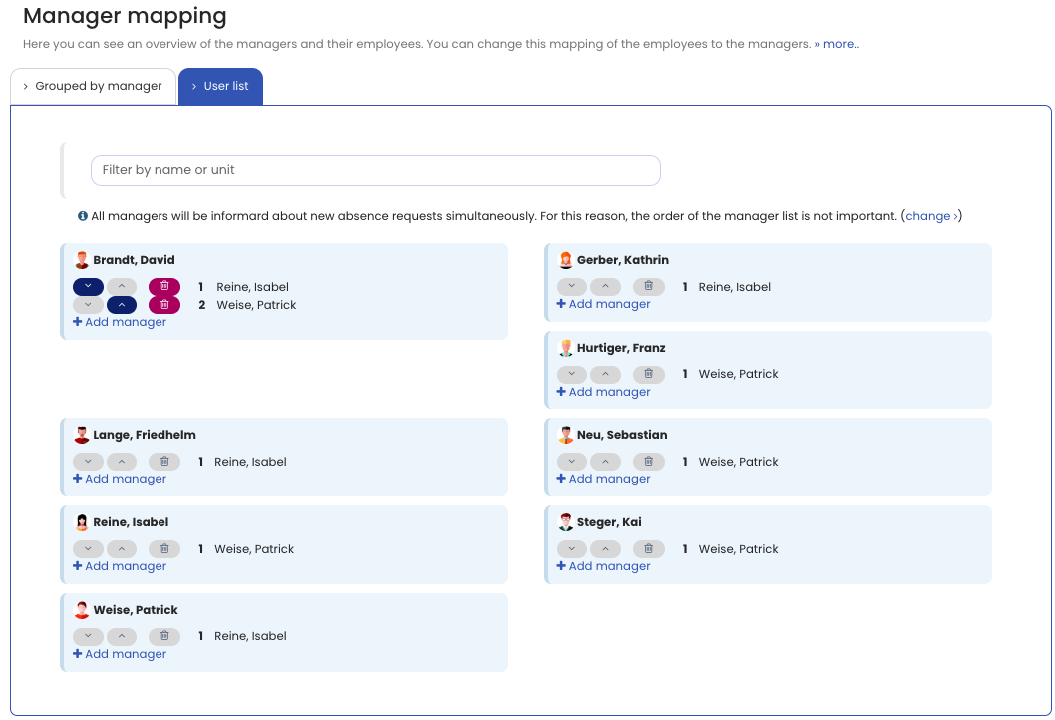
You can assign one or multiple managers to each user. This lets you require two or more managers to approve a request, so a multi-level approval workflow is easily possible.
You can also configure whether, in the case of a multiple assignment, only one of the managers must approve the request or all managers must approve it. If all managers must approve, you can also specify whether the approvals should happen in a specific order.
How to set this up
Sign in to Timebutler as an admin and click Settings > Managers at the bottom left. At the top, in the blue box reading “You can assign one manager to each user. This is the simplest setting and helps all users to understand the software. You may activate the feature to assign more than one manager to each user: Activate now “, click the link Activate now.
You can now assign multiple managers to users on the page. To set the order of the managers, click the Employee list tab on the page.
As soon as at least one employee has two or more managers assigned, click Settings > More… > Global settings and review or change the following two options:
- Several managers - approval
- Several managers - approval order
Not for working time entries
If time tracking is activated and the time tracking settings require managers or admins to approve entries or changes, the following applies:Any one of the assigned managers can process a request to change a working time entry. Approval from only one manager is sufficient, even if multiple managers are assigned to the employee. The multi-level approval workflow therefore intentionally applies only to approval-required absence entries (vacation, training, etc.) and not to change requests for working time entries.
Screenshot: Assign multiple managers