Timebutler sends email notifications to managers and employees in various situations. For example, Timebutler notifies a manager when someone submits a vacation request that requires approval or enters an absence that requires approval.
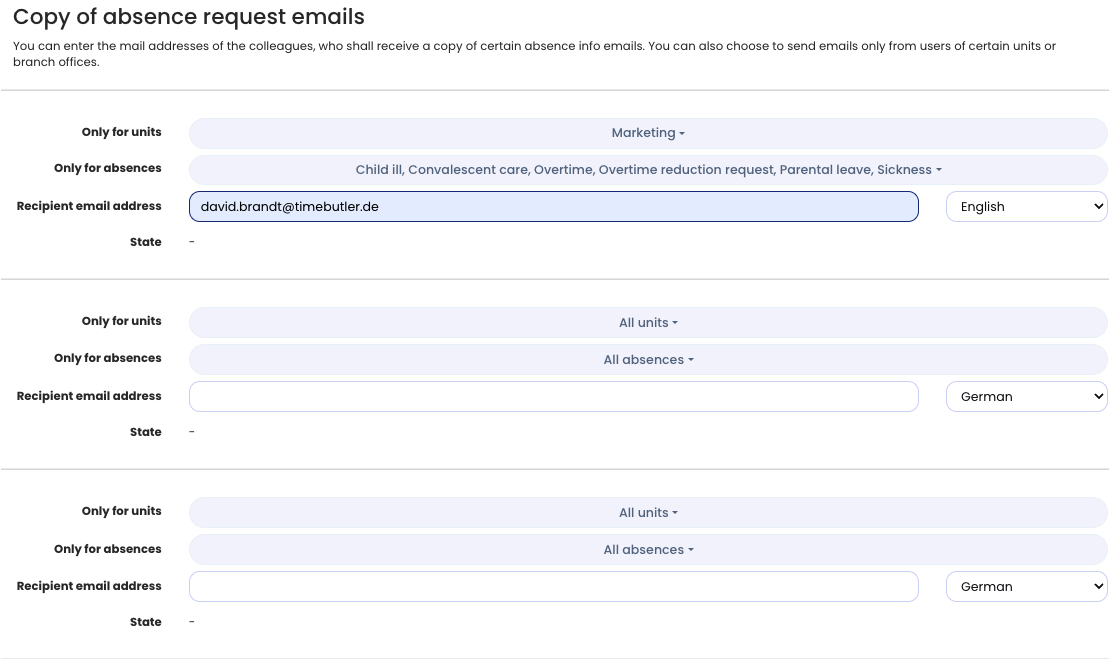
You can also configure Timebutler so that HR, or other email recipients, receive a notification about an absence that requires approval. They are informed without being able to approve or reject the request.
To set this up, sign in to Timebutler as an admin, click Settings > More… on the left, then click Notifications on the right. Now click the Advanced settings tab. Enter the desired recipient email addresses here. You can restrict the notifications to employees in specific departments or locations, and specify that copies are only sent for certain absence types — for example, only for vacation and sick leave.
The recipients will first receive an email with a confirmation link to confirm that they want to receive notification emails. Sending is only activated after they confirm.
Note: Because Timebutler only sends emails for requests that require approval, you cannot notify recipients about absences that do not require approval. There is one exception: you can enable the notification for sickness entries.