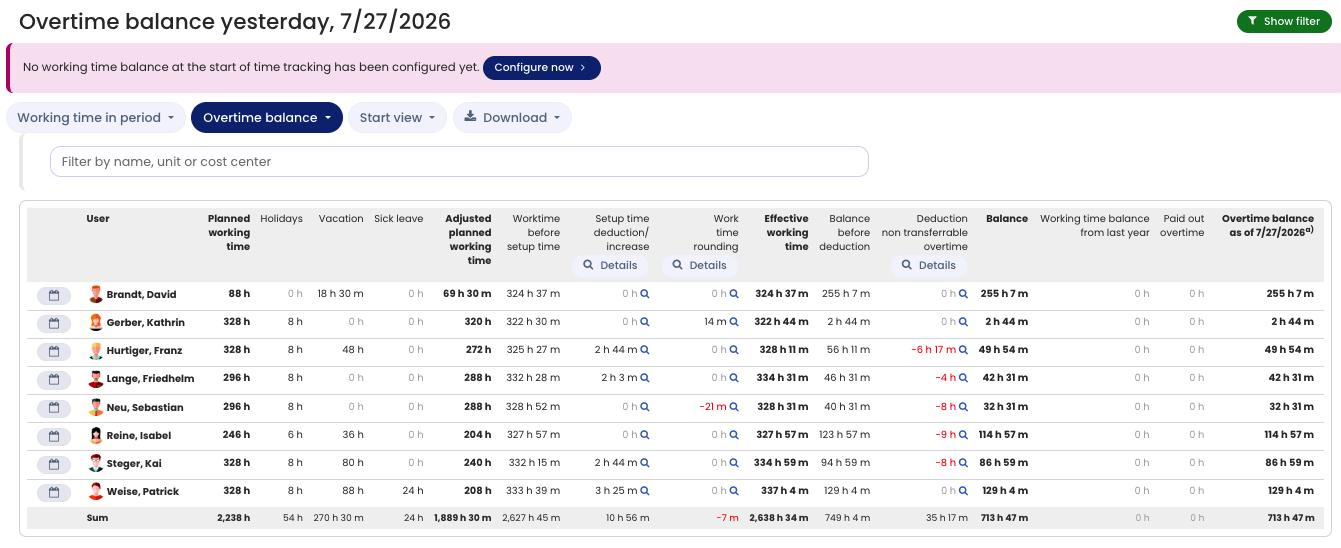
When you open the working time account and switch to the Overtime balance as of the cut-off date view, Timebutler calculates the overtime balance while also applying the monthly overtime capping, the deduction of setup times, the rounding of working times, and other rules. These calculations apply to calendar months and therefore affect the carryover from one month to the next.
In the Overtime balance as of the cut-off date view, you can click one of the Details buttons in the table header to expand the rows showing the values for each individual month. This lets you see how the displayed values are calculated for each month.
The Details button is shown to all user types — employees, managers, and admins. The different roles only have viewing rights for certain users, though: employees, for example, only ever see their own working time account, not the accounts of colleagues.
When is the Details button not shown?
The Details button is only shown when both of the following conditions are met.
Condition 1
The working time account has two views, which you switch between using the two buttons on the page:
Working time in the periodOvertime balance as of the cut-off date
The carryover from month to month, and any capping of overtime or setup times, is only calculated in the Overtime balance as of the cut-off date view. Expanding the months is therefore only useful in this view, and only there is the Details button shown.
Condition 2
The Details button is only shown if at least one person in the working time account has one of the following settings active:
Overtime cappingRounding of working timesSetup times
Only in these cases are monthly calculations (for example, capping or rounding) performed. The monthly detail view is then needed to trace the values of the individual months, so only then does the Details button appear.
- Employees only see their own working time account. If no overtime capping, rounding, or setup times are set for them, the
Detailsbutton is not shown, because no monthly values need to be calculated. - Admins see the
Detailsbutton much more often, because they have viewing rights for all users and often at least one person has the relevant settings (capping, rounding, or setup times) active.
Screenshot: Monthly details in the working time account