
As an admin, you can set the earliest start time in time tracking.
Set the earliest start time
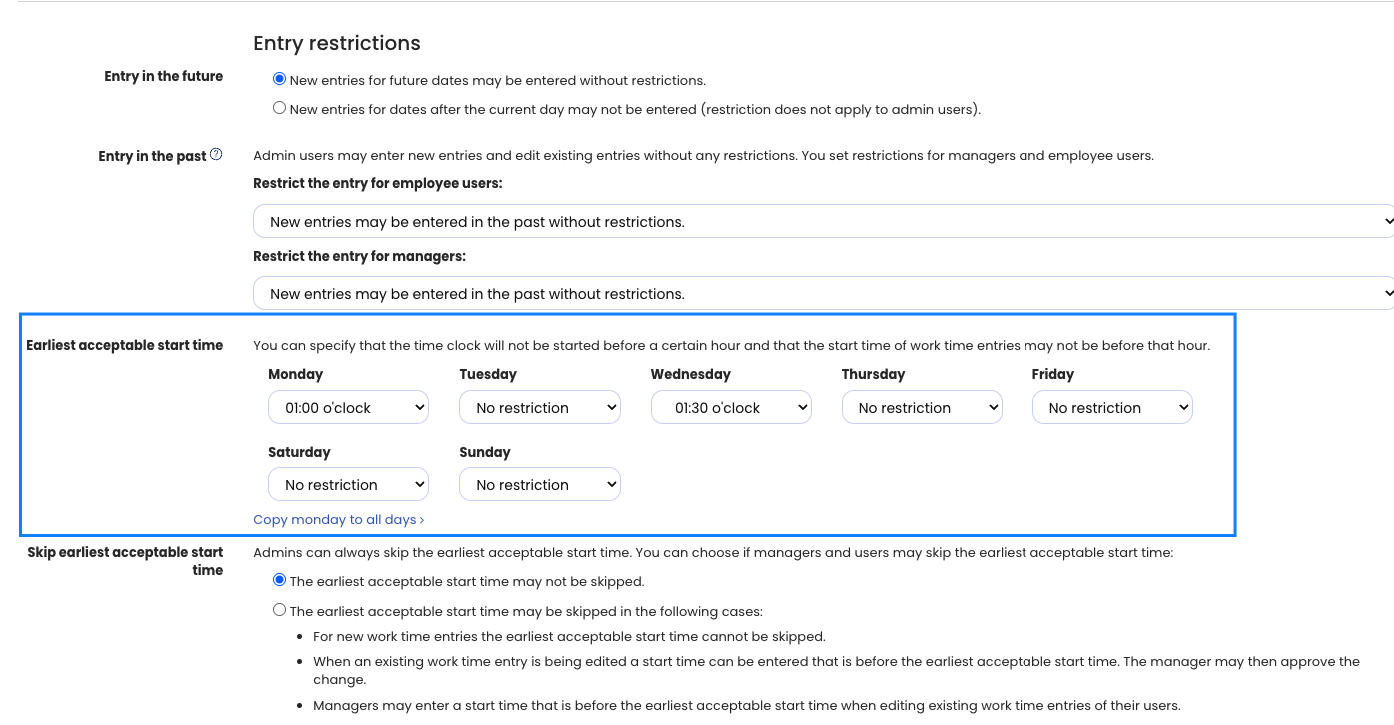
Log in to Timebutler as an admin and click Settings > More… at the bottom left, then Time tracking on the right. Configure the Earliest start time option and click the blue Save button at the bottom.
Set the earliest start time for employees individually
With the setting above, you define the earliest start time that applies to all employees. You can also set the earliest start time individually for single employees. To do this, log in to Timebutler as an admin and click Employees > Employees > Overview at the top left. For the desired employee, click the green button with the pencil (= Edit). Set the Earliest start time (time tracking) option and click the blue Save button at the bottom.
Effect of the earliest start time in time tracking
Entering time entries In the entry form for new time entries, employees can no longer enter a time whose start time is before the earliest start time.
Time clock If an employee starts the time clock before the earliest start time, Timebutler shows that the start is queued. A countdown informs them from when the time clock will start. Exactly at the earliest start time, the time clock starts automatically.
So if you arrive before the earliest start time, you can already clock in and do not need to open the time clock again at the start time.
Allow overriding the earliest start time restriction
Admins can create time entries that violate the earliest start time, but they receive a notice beforehand.
For employee users and managers, you can specify that they may also override the earliest start time restriction under certain conditions. To do this, log in to Timebutler as an admin and click Settings > More… at the bottom left, then Time tracking on the right. Configure the Override earliest start time option and click the blue Save button at the bottom.
Effect of the earliest start time on existing time entries
Changing the earliest start time does not affect existing time entries. Existing time entries stay the same regardless of the change to the earliest start time and are not changed.
When you change the earliest start time, the change only affects time entries that are entered or recorded after the time of the change.
Latest end time
Read the information about the latest end time.